
Articles
Group Schedule Planner Guide: Organise Your Team in 2026
Discover how a group schedule planner can help us organise our team with ease in 2026 Learn practical steps tools and tips for stress free coordination today

Trying to organise a group outing or team meeting? The endless chats, polls that go nowhere, and last-minute changes can leave us feeling more frazzled than connected.
As teams in 2026 become more remote and flexible, finding a time that works for everyone is only getting trickier. What if your group schedule planner could actually make things easier, not harder?
This guide is here to help you create a group schedule planner that puts people first, so you spend less time chasing replies and more time enjoying the moments that matter. We’ll explore how to understand your team’s needs, choose the right tools, plan step-by-step, handle common bumps, and make your approach future-ready. Let’s make group coordination lighter, together.
Understanding Your Team’s Scheduling Needs
Finding the right rhythm for your team takes more than just picking a date and time. A thoughtful group schedule planner can help everyone feel seen and heard, reducing the pressure that so often comes with arranging group activities. Let’s look at how to truly understand your team’s scheduling needs, together.

Identifying Group Dynamics and Preferences
Every group is unique. Whether you’re part of a remote team, a hybrid work crew, an in-person club, or a casual social group, each brings its own flavour to scheduling. Remote teams might juggle time zones, while in-person groups could have more flexibility but still face clashes with personal plans.
Personality types and communication styles play a big role too. Some people prefer a quick poll, others like open chats. According to Asana’s 2023 report, 68% of teams say scheduling conflicts are a top blocker to productivity. This comes as no surprise when you think about morning people, night owls, and weekend warriors all trying to find common ground.
Here’s a quick glimpse at how different teams experience scheduling:
| Team Type | Common Scheduling Challenge |
|---|---|
| Remote | Time zone overlap |
| Hybrid | Balancing in-office/remote days |
| In-person | After-hours or weekend clashes |
| Social Group | Varied availability, spontaneity |
Making a group schedule planner work for everyone means inviting all voices, not just the loudest. When we listen and create space for different preferences, the process feels lighter and more inclusive.
Assessing Availability and Constraints
Getting a clear picture of everyone’s availability is where a group schedule planner really shines. Teams often face a mix of constraints, such as:
- Time zones across regions
- Standard work hours and shift patterns
- Personal commitments and family needs
- Public holidays and special events
Transparency is key. When people feel safe to share their real schedules, finding overlap becomes much easier. Recurring events (like monthly check-ins) or rotating meeting times can help include more people over time.
Visual tools make this process less overwhelming. Shared calendars and polling systems, like Doodle's group scheduling features, allow everyone to see possible options at a glance. This openness helps a group schedule planner turn chaos into a shared sense of possibility.
Setting Goals for Group Coordination
Before diving into dates, it helps to ask: What are we really trying to achieve? A group schedule planner is most effective when it’s anchored to a clear purpose, like regular meetings, celebrating milestones, or hitting project deadlines.
Set gentle expectations for how quickly people should respond, and be honest about how much participation is needed. Not everyone can make every event, and that’s okay.
Start an open chat about what “success” looks like for your group. Maybe it’s everyone making it once a month, or simply knowing that plans are flexible. When the group’s goals shape the planning, the group schedule planner feels like a tool for connection, not obligation.
Balancing Flexibility and Structure
Too much structure can feel stifling, but too much flexibility might leave everyone adrift. The sweet spot lies in simple frameworks, like offering two best options and letting the group choose what feels right.
A group schedule planner can gently guide the process, keeping momentum without forcing commitments. Remember, it’s all about making space for people, not squeezing them in. A little structure helps, but kindness and patience go even further.
Choosing the Right Group Schedule Planner Tools
Choosing a group schedule planner can feel like picking a meeting spot for friends with wildly different tastes. The right tool should just work, blending into your group's habits and making coordination lighter for everyone.
Key Features to Look For in 2026
When picking a group schedule planner, it helps to focus on features that actually make life easier. In 2026, look for tools that work across devices, update in real time, and let everyone control their privacy. Timezone support is a must, especially for remote or global teams.
A visual interface is also key. Seeing everyone’s availability at a glance can help decisions happen faster and with less back-and-forth. And with so many of us on the go, a mobile-first design matters—according to a 2025 survey, 72% of users now prefer planners they can access from their phone.
Here’s a quick checklist for your next group schedule planner:
- Cross-platform (mobile, desktop, web)
- Real-time updates
- Privacy controls
- Timezone support
- Clear, visual availability views
- Mobile-first experience
Comparing Popular Platforms
There are plenty of group schedule planner options, each with its own vibe and strengths. Here’s a simple comparison:
| Platform | Best For | Strengths | Weaknesses |
|---|---|---|---|
| Doodle | Quick polls | Simple, visual, easy for guests | Limited deeper integration |
| Google Calendar | Work/school teams | Syncs with Gmail, AI suggestions | Can feel complex for socials |
| Outlook | Corporate settings | Deep work integration | Less flexible for casual use |
| Teamup | Clubs, projects | Custom views, shared calendars | Less mainstream, learning curve |
New features are making a difference too. For instance, Google Calendar's AI scheduling tool now suggests meeting times based on everyone’s real availability, which means less manual checking and fewer conflicts.
Integrating with Existing Workflows
A group schedule planner works best when it fits around your group’s natural flow. Think about how your team already communicates—does everyone use Slack, WhatsApp, or email? The ideal planner should sync up with those tools, so you’re not jumping between apps or losing track of invites.
Some planners let you:
- Drop calendar links right into chat
- Send automatic reminders by email or message
- Connect with project boards to keep deadlines visible
This kind of integration saves time and keeps everyone in the loop, without adding more noise.
Groop: A Simpler Way to Coordinate Plans
If you’re tired of group chat chaos, Groop is a group schedule planner designed to make things feel natural and fair. It offers automated options, gentle suggestions, and gives everyone an equal say—no pressure, no endless pings.
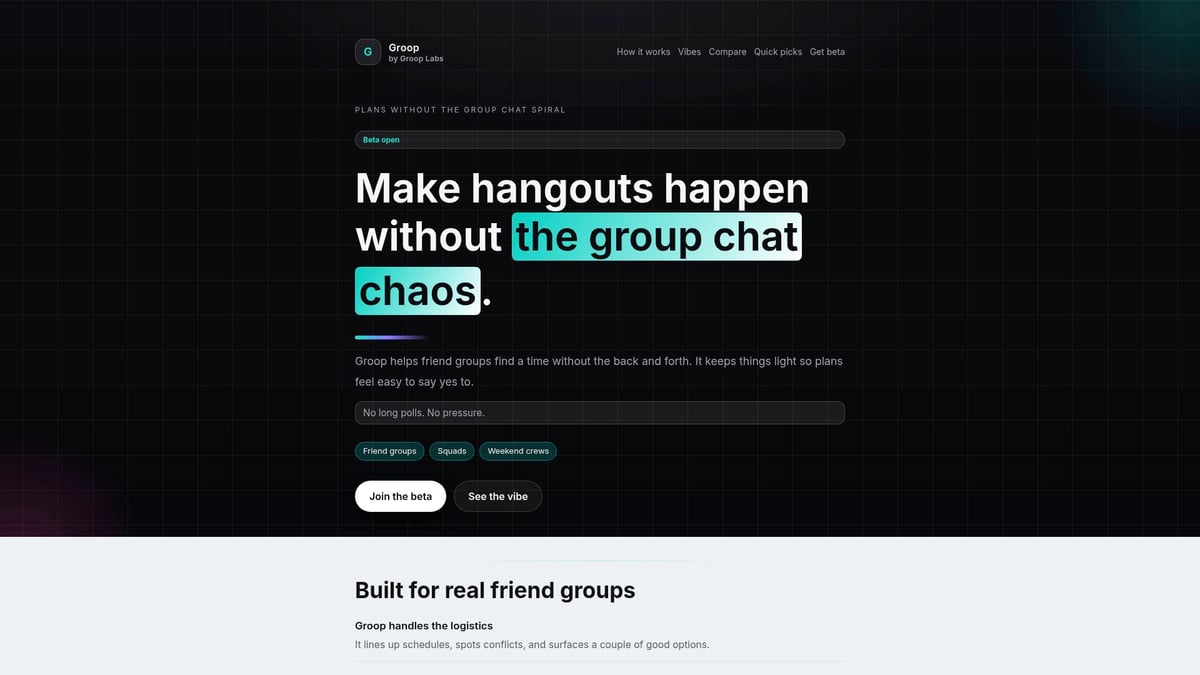
Groop is currently in open beta, so your feedback can help shape a tool that truly fits your group’s style.
Step-by-Step Guide: Planning a Group Schedule in 2026
Let’s make group plans feel lighter. Here’s a gentle, step-by-step way to use a group schedule planner, so everyone can take part without pressure. Each step is about making things easier, more human, and a bit more fun for your group.

Step 1: Gather Group Preferences and Constraints
Start by inviting everyone to share when they’re most comfortable meeting. Use your group schedule planner to send out a simple poll, a quick survey, or even a chat prompt. Keep the tone open: “No rush, just let us know what works for you!”
Sample questions might include:
- “What days or times are usually easiest?”
- “Are there any times you can never do?”
- “Would you prefer mornings, afternoons, or evenings?”
Transparency is key. Let people know it’s okay not to have a firm answer. Some tools, like those inspired by Togedule: AI-driven scheduling research, can even help by learning group patterns over time, making future planning smoother. This step helps your group schedule planner adapt to everyone’s real lives and preferences.
Step 2: Propose Initial Options
Once you have everyone’s input, gently narrow things down to two or three clear choices. Your group schedule planner can make this easy by highlighting the top times that fit most people.
Keep the mood light and optional. Try saying, “Looks like Tuesday or Thursday evening work for most—thoughts?” or “Would you rather keep it casual and decide week by week?” Limiting options means less indecision and more space for real conversation.
Lists can help here:
- Offer a shortlist of dates
- Share the pros and cons of each
- Invite people to suggest alternatives
This approach gives everyone clarity without pressure.
Step 3: Collect Feedback and Adjust
Now, invite honest feedback. Your group schedule planner should make it easy for everyone to respond, whether with an emoji, a quick “maybe,” or a private vote. Some people might not be sure yet, and that’s completely fine.
Encourage responses like:
- 👍 “Works for me!”
- 🤔 “Not sure yet, but I’ll try.”
- ❌ “Can’t make it, sorry!”
Be open to adjustments. If lots of “maybes” appear, consider offering a backup option or keeping plans flexible. The group schedule planner is there to support rather than pressure, so let the group’s natural rhythm guide the pace.
Step 4: Confirm and Share the Final Schedule
Once a consensus emerges, send a clear, friendly confirmation. Your group schedule planner can help by creating a calendar invite, posting a summary in your chat, or sending a gentle reminder.
Templates might look like:
- “Great! We’re set for Thursday at 7pm. Calendar invite on the way.”
- “Looks like we’ll try rotating times—details in the calendar.”
Reminders and invites help keep everyone in the loop. If plans change, just update the invite and let the group know. The goal is to make participation feel easy and natural.
Step 5: Review and Iterate
After your event, check in with the group. Did the timing work? Was the process smooth? Your group schedule planner can make this quick with a thumbs-up poll or a short chat.
Consider these gentle rituals:
- Rotate who suggests times next round
- Ask for favourite moments or what could be easier
- Celebrate when coordination goes smoothly
Over time, your group schedule planner will help you tune the process, making each round feel lighter and more tailored to your team’s style.
Overcoming Common Group Scheduling Challenges
Getting a group schedule planner to work smoothly can feel like herding cats. The good news is, every group faces challenges—so you’re not alone. If you’ve ever felt like plans are always in flux, or wondered how to keep everyone engaged, this section is for you. Let’s explore ways to make group coordination feel lighter and more human.

Navigating Indecision and Last-Minute Changes
Indecision and last-minute dropouts are part of group life. Plans shift, people change their minds, and sometimes the “final” date isn’t so final after all. In fact, 40% of group plans change within 48 hours of being confirmed, according to Eventbrite’s 2024 research.
Here are a few gentle ways to keep your group schedule planner stress-free:
- Offer backup dates and flexible RSVPs
- Let people update their responses easily
- Frame changes as normal, not a bother
If someone is unsure, treat “maybe” as a valid answer. The aim is to make participation feel easy, not pressured.
Handling Time Zone Differences and Remote Members
When your group includes people from around the world, time zones can make a simple meeting feel like a puzzle. Using a group schedule planner with built-in time zone support can help everyone see the options in their own local time.
Consider these ideas:
- Rotate meeting times to share the load
- Use a table or shared calendar for visual clarity
- Try “follow the sun” scheduling for global teams
Empathy goes a long way. Ask remote members what works best for them, and stay open to shifting the routine. A little flexibility can make everyone feel included.
Preventing Organiser Burnout
It’s easy for one person to end up doing all the planning, which can lead to burnout. Sharing the responsibility makes the process lighter for everyone. Automating reminders and using an assistant, like Fellow’s AI meeting assistant, can take some weight off your shoulders.
Try these tips with your group schedule planner:
- Rotate who sets up meetings or polls
- Use templates for invites and reminders
- Let people opt in to help when they have time
The goal is to make organising feel like a shared, supportive task, not a solo mission.
Maintaining Group Engagement
Keeping everyone interested in scheduling can feel tricky, especially if plans change often. Turning the process into a friendly routine helps.
Here are some ideas:
- Celebrate when a plan comes together
- Use emojis, gifs, or quick polls to keep things light
- Thank people for their input, even when they can’t make it
A group schedule planner works best when everyone feels heard and included. Focus on positive moments, and remember—it’s okay if not every plan is perfect.
Future-Proofing Your Group Scheduling Approach
The way we plan together keeps changing, and that’s a good thing. If your group schedule planner feels a bit stuck or too rigid, it might be time to look at what’s next. Let’s explore how to keep your team’s coordination approach fresh, flexible, and ready for whatever the future brings.
Embracing New Technologies and Trends
It’s exciting to see how fast group schedule planner tools are evolving. In 2026, we’re seeing AI-powered assistants that suggest meeting times based on everyone’s habits, predictive analytics that spot scheduling clashes before they happen, and even experiments with virtual reality meeting spaces.
These advances can make group coordination feel easier and more intuitive. Still, it’s wise to try new features slowly, checking in with your group about what actually works for your style. Sometimes, a simple poll beats a flashy algorithm, and that’s perfectly fine.
Building a Sustainable Scheduling Culture
A group schedule planner works best when it fits into your team’s rhythm, not the other way round. Building habits like regular check-ins or quick “favourite times” polls each season helps keep things light and predictable.
Consider simple rituals, like sharing wins when a plan comes together or letting someone new suggest the next meeting slot. This kind of culture makes planning less of a chore and more of a shared, positive experience for everyone.
| Habit | Benefit |
|---|---|
| Regular check-ins | Keeps everyone aligned |
| Favourite times polls | Easier decision making |
| Sharing organiser role | Reduces burnout |
Adapting to Changing Team Dynamics
Teams change, and so should your group schedule planner approach. When someone joins or leaves, take a moment to revisit how you’re planning together. A quick welcome message or a check-in on preferred times can go a long way.
Groups that thrive through change are often those that stay open and flexible. If your team starts working across new time zones or shifts to a different workflow, don’t be afraid to tweak your process. Adaptation is a sign of a healthy, people-first group.
Keeping People at the Centre of Planning
At the end of the day, every group schedule planner should feel like a tool for people, not a system to control them. Empathy, autonomy, and flexibility are what make coordination feel human and supportive.
Remember, the best approach is the one that fits your group’s unique needs, quirks, and rhythms. If your process feels too heavy, it’s always okay to simplify or try something new. Keeping people at the heart of planning is what makes every plan feel possible.If you’re ready to leave behind the hassle of endless group chats and indecisive polls, you’re not alone—organising a team doesn’t have to feel chaotic. We’ve explored how understanding your group’s needs and using the right tools can make planning in 2026 feel effortless and even enjoyable. If you’d like to try a simpler way to coordinate plans—one that gives everyone a voice and keeps things light—why not join the beta? Let’s make group scheduling something we all look forward to, together.